Readout
At a Glance
Bench fit
Best For
Bench fit notes
Working distance and field of view
- Working distance
- 45 mm
- Field of view
- Slide-stage field; narrow at high power
These two specs matter more than headline magnification for soldering, inspection, and manipulation work.
Lighting and stand behavior
- Illumination
- LED ring
- Stand stability
- Stable for prepared slides
Glare control and wobble usually decide whether a scope feels precise after the first week.
Overview
The short version
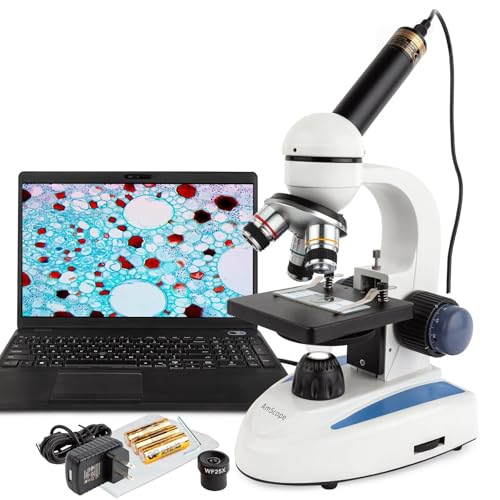
The AmScope ME300 keeps showing up on 'best beginner microscope' lists for a reason that doesn't appear in any spec sheet: it's the rare $49 USB microscope that actually behaves like a microscope, not a glorified webcam. The optics are real compound-style — separate objective lenses with stepped magnification — instead of the single-lens digital zoom that most cheap USB scopes use to hit their headline numbers.
That distinction matters more than the 40x–1000x range printed on the box. A digital-zoom USB microscope advertised at 1000x is doing 200x optical and 5x sensor crop. The image breaks down past the optical limit. The ME300 uses three rotating objectives (4x, 10x, 40x) feeding a 25x eyepiece-equivalent imaging stack, so the magnification you see on screen is actually being resolved by glass, not interpolated by software.
Where this scope falls down is anything involving working distance. The 45mm clearance under the 40x objective sounds fine until you try to slip a PCB or a thick mineral specimen under it — there's no room for a soldering iron, no room for tweezers, no room for fine manipulation. If you're buying for electronics repair or specimen work where you need to interact with the subject under the scope, the ME300 is the wrong tool. For looking at slides, leaves, fabric, salt crystals, and anything you'd put on a microscope stage and leave alone, it's the best $49 you can spend on this category.
Balance sheet
Pros and Cons
Pros
05- 40x–1000x optical magnification covers most hobbyist use cases
- USB plug-and-play — no drivers needed on Windows 10/11 or macOS
- LED ring light with brightness control reduces glare on specimens
- Compact footprint fits on any workbench without dedicated space
- Included slides, cover slips, and forceps make it ready to use out of the box
Cons
04- 1.3MP camera is serviceable but produces grainy images above 400x
- Plastic body feels lightweight — not a concern for home use but noticeable
- No built-in screen; requires laptop or PC to view live feed
- Focus mechanism has slight backlash — fine-focus can be tricky at 1000x
What 'USB Microscope' Actually Means at This Price Point
The USB microscope category is roughly split into two camps: handheld inspection scopes (Celestron, Plugable, Jiusion — single-lens cameras with built-in LED and software zoom) and compound USB scopes like the ME300 that mimic the architecture of a traditional school biology microscope. The handheld type is what most people picture when they hear 'USB microscope.' The ME300 is the second type, and that has real implications for what it can and can't do.
Compound architecture means you get true optical magnification at each step. Drop the slide on the mechanical stage, focus through the eyepiece-equivalent path (here, the camera sensor), and the image is being formed by the same physics as a real microscope. You can see cellular detail in onion skin, follow capillary action in a leaf vein, see the bristles on a fly's leg. None of which a single-lens handheld scope can resolve no matter how high the sensor megapixel count.
The trade-off is the form factor. Compound scopes have a fixed stage, fixed objective rotation, and a working distance dictated by the objectives. You can't take this scope to a coin show or use it to inspect a circuit board mounted in a chassis. It's a benchtop instrument that needs the specimen brought to it, prepared on a slide or held in the stage clips.
Image Quality Through the Full Magnification Range
At 40x and 100x the ME300 produces clean, well-resolved images that hold up to print or large-screen viewing. The 1.3MP sensor is the limiting factor here — it's enough resolution to capture what the optics can deliver at low and middle magnifications, and the LED ring light keeps the image bright enough to avoid the noise issues that plague low-megapixel sensors in dim conditions.
At 400x the image is still usable but you start to see the sensor's pixelation. A typical use case at this range — looking at pollen grains, identifying fabric fibers, examining insect mouthparts — works fine but the details that would be sharp on a 5MP scope go a little soft. This is where the price-point trade-off becomes visible. A $200 USB compound scope (Celestron LCD Digital II, Swift SW380T) gives you cleaner 400x imaging because of better sensors, not better optics.
At 1000x the ME300 produces an image but the 1.3MP sensor genuinely can't resolve what's there. You're looking at a soft, slightly blurry version of whatever cellular detail the optics are picking up. For occasional 1000x inspection — checking bacterial colonies on a prepared slide, looking at high-resolution textile samples — it's adequate. For sustained 1000x work you'd want a real research-grade scope and a 5MP+ camera, which puts you in $500+ territory.
Who Actually Buys the ME300 (and Who Should Look Elsewhere)
Buy the ME300 if you're a parent setting up a home microscope station for a curious kid, a homeschool teacher building a biology unit on a budget, a beginner naturalist who wants to start looking at pond water and leaf samples, or a hobbyist who needs to occasionally examine a small specimen on a slide and doesn't want to spend more than $50 to find out if microscopy is even interesting to them. For all of those use cases, the ME300 hits well above its price.
Don't buy it for electronics repair. The 45mm working distance at low magnification (and much less at high magnification) means you cannot fit a soldering iron, fine tweezers, or even a PCB with tall through-hole components under the objective with any margin to work. Repair techs need a stereo microscope (the AmScope SM-4TZ in this lineup) or a digital scope with a long boom arm (the Andonstar AD407). The ME300 will frustrate you within a week.
Don't buy it for serious specimen photography or scientific documentation. The 1.3MP sensor and basic software output (raw frames, no calibration, no measurement tools) aren't enough for publication-quality work or precise specimen measurement. Step up to the AmScope T490B series with a dedicated 5MP+ camera if photo quality matters.
Don't buy it as a portable inspection tool. The 5-lb body and mandatory laptop or PC connection make this a benchtop fixture, not a field instrument. The Celestron Handheld Pro in this same lineup is the right answer for portable use.
The Real Software Story (Which AmScope Won't Tell You)
AmScope ships their own capture software (ToupView on Windows, AmScopeMacApp on macOS) and the experience is bad enough that it's worth covering separately. ToupView works but feels like 2010 freeware. AmScopeMacApp is notably worse — slow preview, frequent crashes on M-series Macs, no autofocus assist, basic capture and save only. Both apps will let you grab still images and short video clips, and that's about all you should expect from them.
The better path for most users: skip the AmScope software entirely. The ME300 presents as a standard UVC webcam to any operating system. That means you can use it with OBS Studio (free, cross-platform), Photo Booth (macOS), the Windows Camera app, or any video capture program that talks to webcams. OBS in particular gives you better preview quality, hotkey-based capture, and the ability to record raw video at the scope's native frame rate without software-imposed compression artifacts.
For scientific work that needs scale bars, measurements, or stitching: use the scope as a UVC camera in ImageJ (free, the de facto microscopy analysis tool). ImageJ plus a calibration slide ($10–$15 on the side) gives you actual measurement-grade output from a $49 scope. This is the workflow most ME300 buyers don't know about and the one that makes the scope genuinely useful for serious hobby work.
Calibration and Measurement Limits
The ME300 can support useful hobby measurements, but only if you calibrate the software at the exact objective and capture setting being used. A cheap stage micrometer or calibration slide is the right accessory. Calibrate in ImageJ or ToupView, save that calibration profile, and recalibrate every time you change objective, camera resolution, or digital zoom.
Treat the 1000x claim as viewing magnification, not measurement-grade resolution. At the highest setting, depth of field is tiny and the 1.3MP sensor is the limiting factor. For classroom sketches, specimen exploration, and basic documentation this is acceptable. For publishable measurements, calibrated scale bars, or repeatable metrology, step up to a microscope-camera setup with more sensor resolution and a better fine-focus mechanism.
Alternatives at $49, $89, and $139
If you want a true USB compound scope and the ME300 is sold out (it happens), the Plugable USB Microscope ($59) is the closest direct alternative. Same general architecture, slightly better stand quality, slightly worse software. Image quality is comparable. Either one is the right choice in the $50-and-under tier.
If you have $89 and want a portable scope instead of a compound benchtop, the Celestron Handheld Digital Microscope Pro (reviewed elsewhere in this lineup) is the better buy. Lower magnification ceiling (200x vs 1000x) but you can take it to a rock show, examine a coin in your hand, or inspect a circuit board in a chassis. Different tool, different use case.
If you have $139 and the electronics-repair use case is on the table, jump straight to the Andonstar AD407. Built-in screen, 220x ceiling, 120mm working distance — it's the right tool for SMD soldering and PCB work in a way the ME300 simply isn't. For pure biology/specimen work where the ME300's compound architecture matters more than working distance, the price gap doesn't close until you get to the Swift SW380T at $300+.
The ME300 wins its category by being the cheapest scope that does real compound microscopy. Above $80 the trade-offs change, and other tools become better answers.
Verdict
Our Verdict
The AmScope ME300 is the right first microscope for many hobbyists and classrooms. At $49 it's a low-risk entry into USB microscopy, and the 40x–1000x range is useful for slides, insects, coins, stamps, and basic biology. Don't buy it for PCB soldering; the working distance is too short. Do buy it if you want a simple starter scope.
Full readout
| Full Specifications | |
|---|---|
| Working Distance | 45mm |
| Illumination | LED ring |
| Stand / Mount | Compound-style stage |
| Stand Stability | Stable for prepared slides |
| Magnification | 40x–1000x |
| Field of View | Slide-stage field; narrow at high power |
| Camera Resolution | 1.3MP |
| Frame Rate | 30fps |
| Screen Size | Nonein |
| Connection | USB-A |
| Built-in Screen | No |
| Camera Included | Yes |
| Calibration Support | Software calibration with slide |
| Mount Thread | — |
| LED Count | — |
| Brightness Control | — |
| Color Temperature | — |
| Power | — |
| Stand Included | Yes |
| Weight | 0.45kg |
Buying call
AmScope ME300 Digital USB Microscope
Best if you need 45 mm working distance with LED ring for general hobby work.
Prices may change · Check current Amazon listing before buying
FAQ
Frequently Asked Questions
Is the AmScope ME300 good enough for high school biology?
Can the ME300 be used for PCB inspection or soldering?
Why does my AmScope ME300 image look fuzzy at 1000x?
Does the AmScope ME300 work on Mac, including M-series chips?
Go deeper
Related Buying Guides
Versus